Journal comparison
Screenshot journal or broker-import journal?
Choose around the question you need your journal to answer. Chart review and execution accounting start from different records, and you may want both.
Two ways to keep the record.
This compares workflows. Import-focused products can also offer screenshots, notes, and visual review; the details vary by product and plan.
| What matters | Screenshot review with EdgeBook | Broker-import workflow |
|---|---|---|
| Starting record | The chart screenshot, with your setup, notes, tags, and execution rating. | Executions brought in through a supported connection or statement format. |
| Review question | What did I see on the chart, and did my action match my written setup? | What happened across my fills, quantities, timestamps, fees, and results? |
| Capture work | Save the relevant chart and add context while you remember the decision. | Import the execution record and check that trades, fees, and fills reconcile. |
| Broker coverage | A broker connection is not needed for EdgeBook screenshot journaling. | Coverage depends on the service, broker, account, market, plan, and import method. |
| What to check | Image quality, useful tags, review notes, and whether you can find the chart again. | Auto-sync versus file upload, supported instruments, fee handling, and partial-fill grouping. |
Start with your review question.
Review the decision
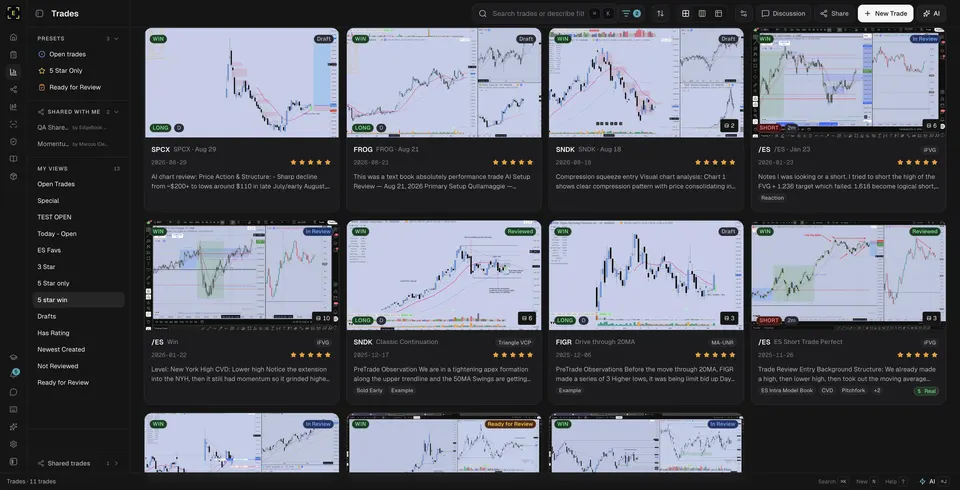
If your question is “Did I wait for the level I marked?”, preserve the chart at entry and write the condition you were following. In EdgeBook, keep the image with tags, a note, and an execution rating. Use the board to return to trades that still need review.
The screenshot-journal guide shows that process, including what the chart reader fills and what you need to check yourself.
Reconcile the executions
If your question is “Did every fill and fee make it into my record?”, start with the broker statement and verify the import. An upload format and a live sync connection are different mechanisms. Confirm the one your broker and account support.
For current examples, check Tradervue's broker list and TraderSync's supported brokers. Verify plan limits and the import method on the provider's site.
Keep both records connected.
Use a date, symbol, and trade reference on the chart note. After checking the executions against the broker statement, review the screenshot against the conditions you wrote before the trade.
For a manual starting point, the free trading-journal worksheet has columns for the note and screenshot link. It has no formulas and is separate from EdgeBook.
To see the product's billing options, read EdgeBook pricing or the homepage pricing summary.
This guide is published by EdgeBook and describes its own workflow. It is not an independent product ranking. Provider links were checked October 27, 2026; capabilities and plans can change.
Before you choose.
What is the difference between a screenshot journal and a broker-import journal?
A screenshot workflow starts with the chart and the decision you recorded. An import workflow starts with executions from a supported broker connection or statement file. A product can support both; compare the actual capture and review process rather than the label.
When is a screenshot journal useful?
It is useful when your review depends on the setup, marked levels, higher timeframe, and the decision you made at entry. Record that context while it is fresh, then review the chart beside your notes and execution rating.
When should I prioritize broker imports?
Prioritize an import workflow when your main need is a complete execution record with quantities, timestamps, fees, and partial fills. Check the exact broker, account type, market, import method, and subscription plan before choosing a tool.
Can I use both workflows?
Yes. Keep your broker statement as the execution record and use screenshots for visual review. Use a consistent date, symbol, and trade reference so you can match the chart and note to the executions later.
What does EdgeBook cost?
EdgeBook costs $33 USD per month or $299 USD per year, plus any applicable tax. Both billing options include the journal, 5GB of chart storage, and a monthly EdgeBook AI allowance. Subscriptions renew automatically until you cancel.