Free worksheet
A trading journal template you'll review.
Record the trade while you remember it. Keep the chart beside the note. This free CSV and review sheet give you a starting point in Excel, Google Sheets, or the journal you already use.
Keep the facts and the context.
Each row holds one trade. The screenshot link keeps the chart within reach when you review it.
The CSV has 15 columns: date, symbol, direction, timeframe, setup, entry, exit, stop, quantity, result, R multiple, execution rating, tags, review note, and screenshot link. Enter only what you track. Prices and results are manual; the worksheet does not connect to a broker or calculate returns.
For a screenshot link, use a file location or an image link you can reopen. Check its sharing settings before sending the sheet to someone else.
Save the chart
Capture your entry, exit, and any higher timeframe that shaped the decision. Keep your marked levels visible.
Write the decision
Name the setup and explain why you entered. Separate what you saw then from what the chart showed later.
Grade the execution
Record the outcome, then give execution its own rating from one to five. A winning trade can still break your rules.
Return to the note
Set a weekly review. Compare trades from the same setup and write one specific thing you will check next time.
A note you can copy.
Paste these prompts into your notes editor. Answer in your own words while the decision is still fresh.
Use the same prompts on the next trade so you can compare the decisions later. Add links to the entry and exit screenshots beside the note.
SETUP
What was I looking for?
What would have ruled the trade out?

DECISION
What did the chart show at entry?
What did I actually do?

REVIEW
Did I follow my written conditions?
How do I rate the execution, from 1 to 5?
What should I check on the next trade?

CHARTS
Entry screenshot:
Exit screenshot:
Higher timeframe:
Make the lesson specific.
A useful review records a decision you can check against the chart.
For example, “I need more discipline” is hard to review. The note opposite identifies the written condition, the action, and a question for the next review.
Illustrative review note for the worksheet.
- Written condition
- Wait for the pullback to reach the level marked on my chart.
- What I did
- I entered before price reached that level. I attached the entry screenshot so I can check the sequence.
- Review question
- On my next review, compare the entry screenshot with the condition I wrote before the trade.
Put the chart in the journal.
When screenshot folders and sheet rows become hard to keep together, EdgeBook keeps the image, tags, rating, and note on the trade.
Follow the screenshot trading journal guide to drop or paste a chart, tag the setup, annotate it, and review it on a board. The CSV above remains a standalone worksheet; it is not an EdgeBook import format.
For setup instructions, see chart screenshots, sharing a trade for feedback, and review statuses.
See EdgeBook pricing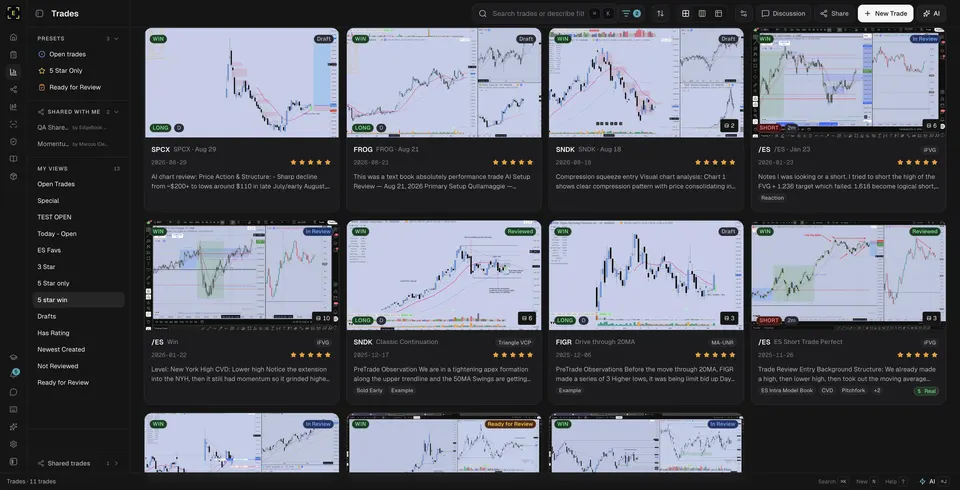
Before you download.
Is the trading journal template free?
Yes. The CSV and review prompts are free to download and use without an account or an email address. EdgeBook is a separate paid product.
Does the CSV calculate my trading results?
No. It is a blank worksheet for manual entries, with columns for your prices, result, R multiple, execution rating, and review note. It contains no formulas or broker connection.
Can I use the template in Excel or Google Sheets?
Yes. Download the CSV and open it in Excel, or import it into a new Google Sheet. Add a row for each trade and keep the screenshot links accessible to you.
How do I use this workflow in EdgeBook?
Start a trade from a chart screenshot, add your setup, tags, notes, and execution rating, then review it with the chart in view. The screenshot-journal guide shows the workflow. The downloadable CSV is a standalone worksheet, not an EdgeBook import format.